The short version: If you already have video ads selling your product on Meta, you have a useful starting point for YouTube. Google is pushing Demand Gen hard, and I think the channel deserves more attention. Start with your proven creative, give the test a defined budget, and measure whether it brings in new customers.
In practically every call I have with Google, they’re asking us to spend more on Demand Gen. Emails, account audits, follow-ups. They are really pushing it.
This week I’ve also been tracking down the original video files for ads that are already working on Meta so we can test them on YouTube. We have the creator, the product demonstration, the hook, and evidence that the message gets people to buy. I want to see what happens when we put that in front of people somewhere else.
Those two things are coming together for me. Google wants more of the budget advertisers put into finding new customers, and a lot of us already have the creative to give YouTube a serious test.
Google is making the pitch pretty clear
Here’s an email with recommendations Google sent me for AppSumo. Increase the budget. Open up more inventory. Add product feeds. Add more video formats.
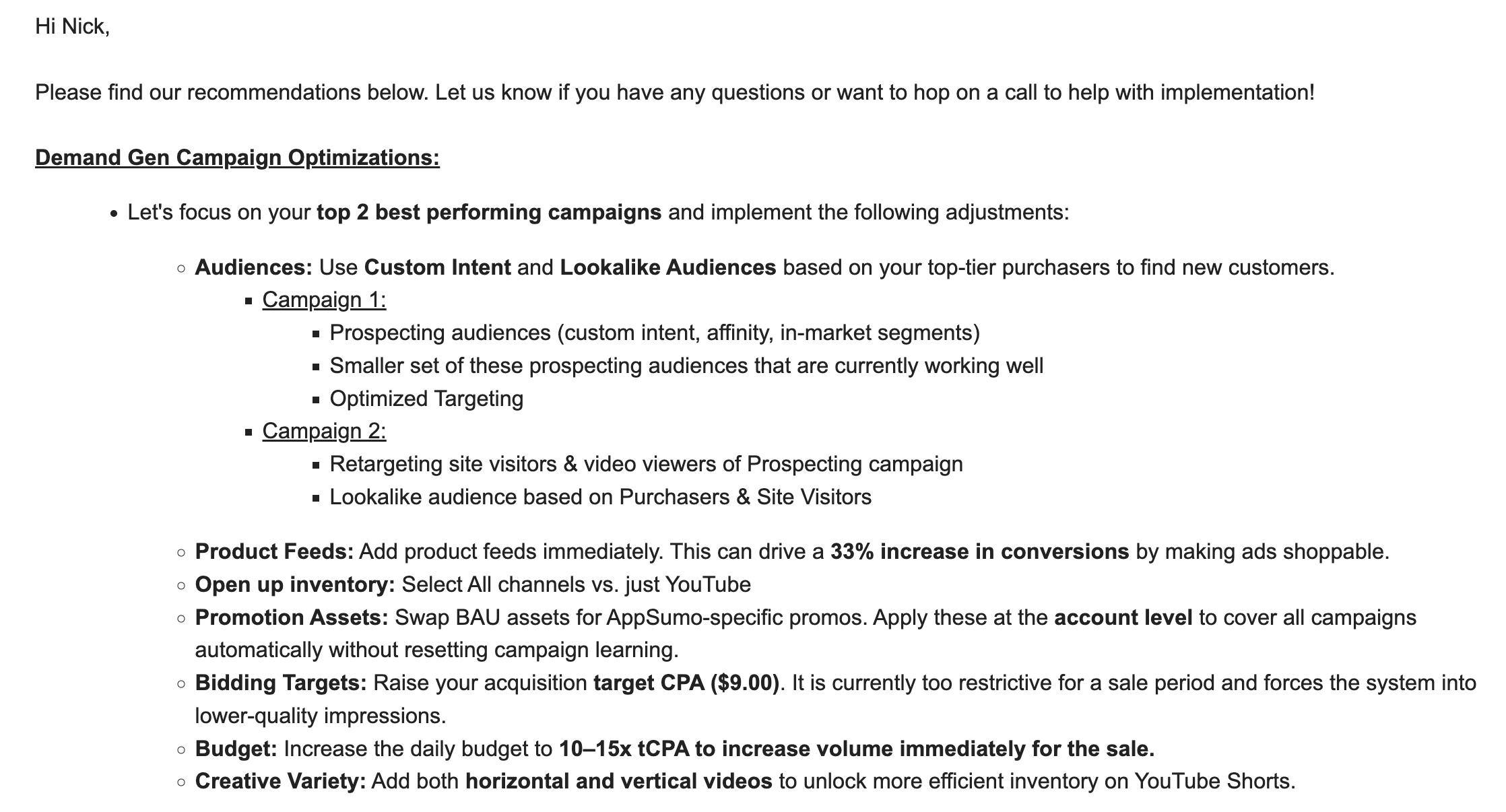
That’s Google’s advice for that account at that point in time. The uplift claim and budget guidance in the email are their recommendations, not results I’m claiming we achieved.
Another audit made the push even more obvious. The slide showed 0.49 reported ROAS and a $165.53 CPA, while recommending taking the daily budget from $450 to $1,000 or more. It also flagged conversion-tracking issues.
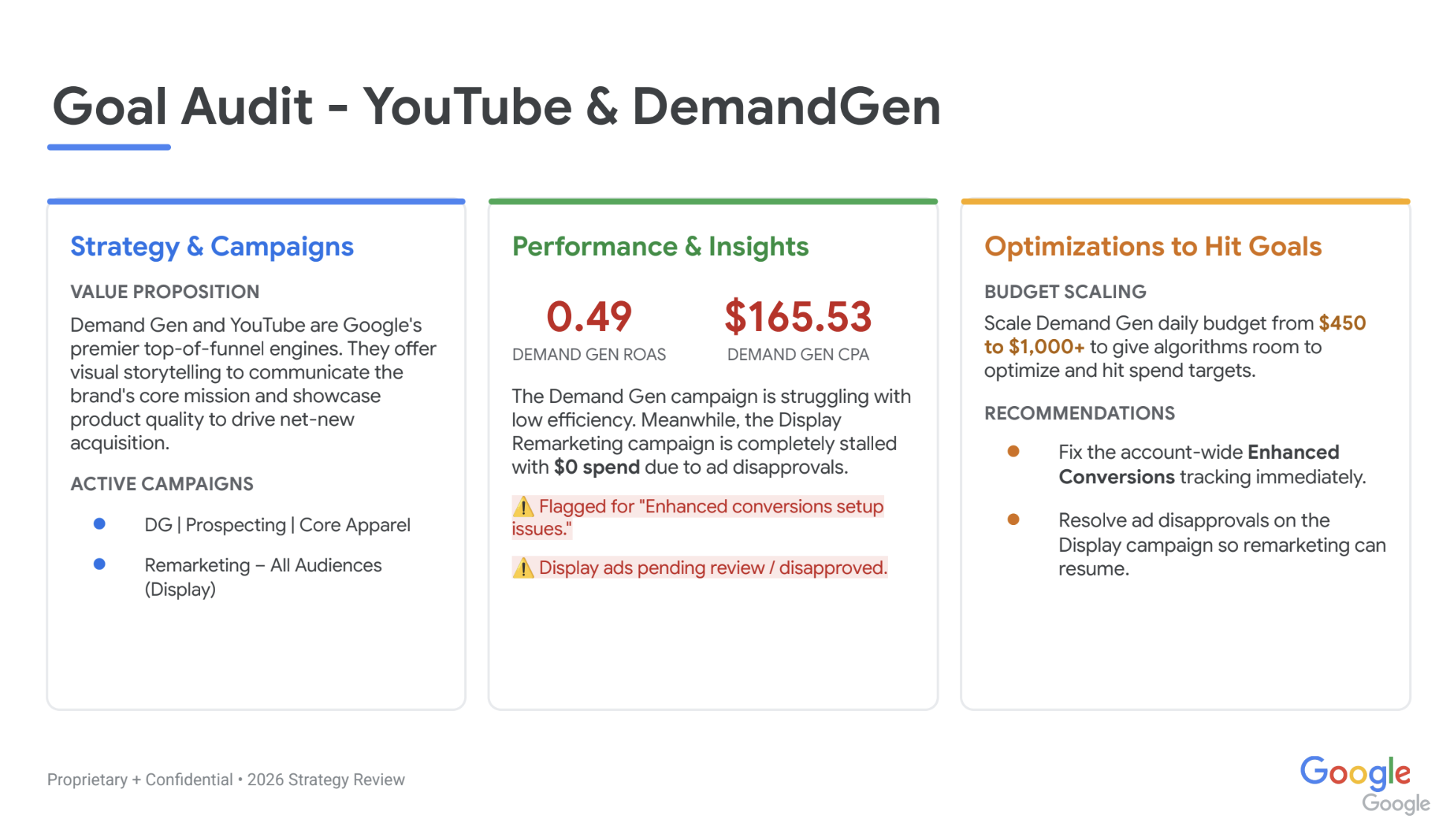
This is a separate, anonymized account audit. It’s a historical snapshot of Google’s recommendation, not current performance or a before-and-after result.
I’m interested in YouTube, but I’m still going to question that recommendation. If the same slide tells me tracking needs fixing and spending needs doubling, I want to understand the measurement and the economics before I put more money behind it.
Then there’s this follow-up about moving Display activity into Demand Gen.
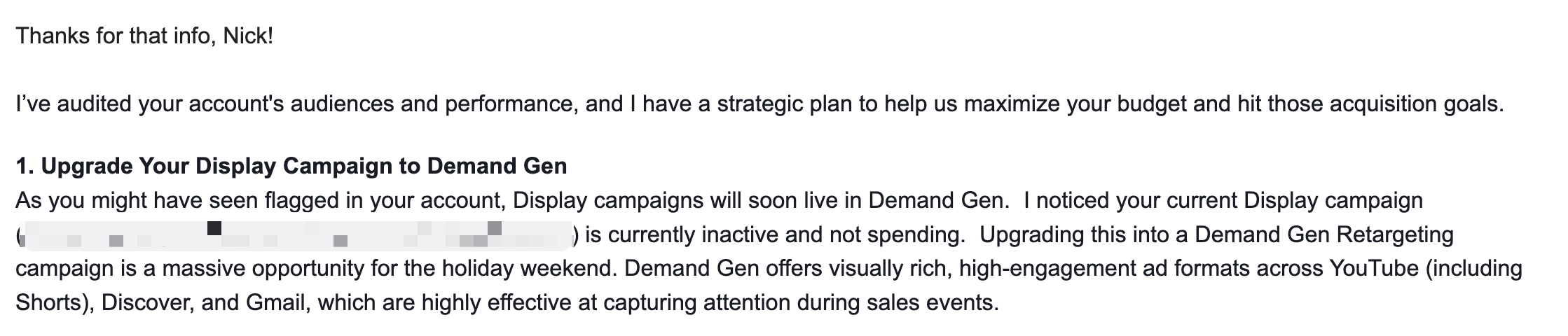
The product changes support what I’m hearing on calls. Google has announced the transition of Display Ads into Demand Gen, with the transition expected to complete by 2027. It has also introduced reporting columns designed to make comparisons with social advertising easier.
My read is that Google wants YouTube to compete much more directly for the acquisition budget people put into Meta. Reach someone before they search for you, show them something they care about, and give them a reason to buy.
Demand Gen includes other Google surfaces too. If the question is whether YouTube works for your business, check where the money actually goes. A Demand Gen campaign name alone doesn’t tell you that.
The three YouTube placements, and where the purchases came from
When you choose YouTube inside Demand Gen, you can select in-stream, in-feed, and Shorts. This is the screen I’m talking about.
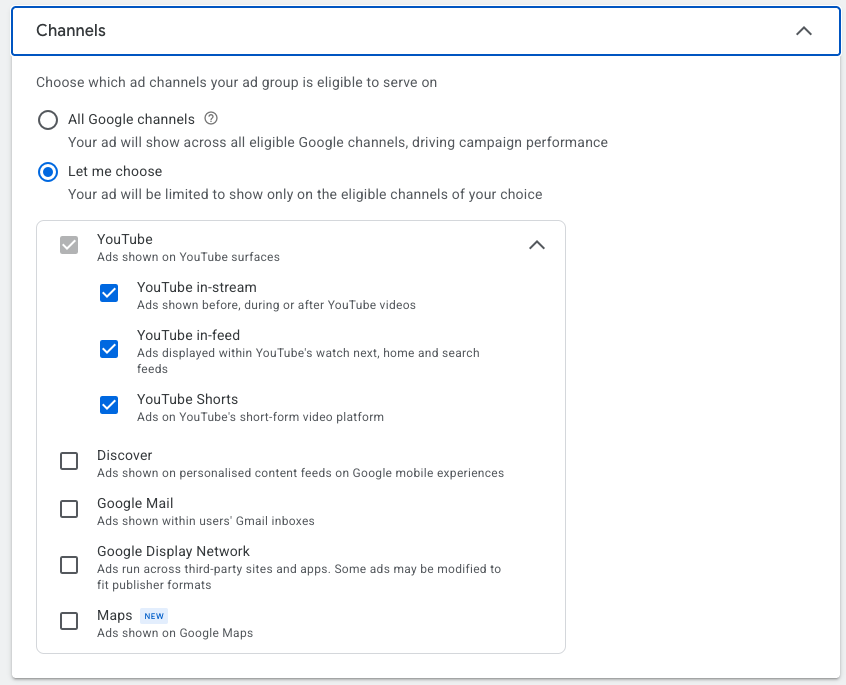
In-stream plays before, during, or after the video someone came to watch. Think about the opening five seconds: can someone understand the product and find a reason to keep watching before they skip? This is where I’d test a creator who can demonstrate something and explain it clearly.
In-feed appears while people browse YouTube, including Home, search results, and related videos. The thumbnail and headline have more work to do here. They need to make someone interested enough to watch. A good video with an uninteresting thumbnail can lose before the person hears a word.
Shorts sits between videos in the Shorts feed. Vertical creator footage is a natural starting point. I want the product and the point to show up quickly, with captions I can actually read on a phone. Google’s format guide explains the different viewing experiences; its channel controls let you choose which ones to test.
I pulled the last 30 completed days from a live account, September 14–October 13, 2026. Here’s the split across its Demand Gen campaigns:
- In-stream: 77.4% of Google-attributed purchases, $29,422 spent, $38.13 platform CPA.
- In-feed: 9.8% of Google-attributed purchases, $3,763 spent, $38.67 platform CPA.
- Shorts: 12.8% of Google-attributed purchases, $6,872 spent, $53.81 platform CPA.
These are purchase conversion credits reported by Google, which can be fractional. They’re not counts of verified new customers. I checked the network breakdown too: all but a fraction of a cent of the roughly $40,057 spend went to YouTube. The percentages use the combined purchase credit across these three formats, pulled October 14; recent conversions can still arrive later.
In-stream is doing most of the work in this account, with in-feed close on reported CPA. Shorts has a higher CPA across this period, including newer tests. That gives me a reason to keep testing the creative and watching delivery. It doesn’t give me a reason to call Shorts the winner just because I like vertical creator videos. The budgets, audiences, and creative weren’t held equal, so this is an account breakdown rather than a controlled comparison of formats.
A placement and a device are two different things
Connected TV means someone watching YouTube on a television or streaming device. It isn’t a fourth checkbox underneath YouTube, and it doesn’t necessarily mean the YouTube TV subscription service.
In-stream can reach people on phones, computers, tablets, and connected TVs. In-feed is the browsing experience you’ll recognize on mobile and desktop, with availability varying by surface. Shorts is designed around a mobile-style viewing experience, but I wouldn’t use “Shorts” as a synonym for “mobile only.” Check actual device delivery rather than assuming the format tells you the screen.
For the same account and dates, YouTube’s device report credited 41.4% of purchases to mobile, 19.6% to desktop, 10.9% to tablets, and 28.1% to connected TV. That’s a separate cut of the same purchase credit, not another set of purchases to add on top. Google documents device and format reporting as separate segments.
The TV number matters. A person can watch on the couch and buy on a phone later. Google’s attribution can connect some of that activity, but a reported TV conversion doesn’t mean somebody completed checkout with their remote. I’d make the product, brand, and next step clear enough to remember, rather than depending on an immediate website click.
Your Meta account has already done some of the work
Finding a person who can talk about your product without sounding like they’re reading a script takes work. So does finding a hook that gets attention and a demonstration that makes somebody understand why they’d want the thing.
If you’ve been testing video on Meta, you’ve already paid to learn some of this.
That’s why I’d start there. Go through the videos that have generated purchases on meaningful spend. Watch them again. What is the person saying? What are they showing? Is there a specific objection they answer, or a product detail that makes the sale easier?
A creator showing how a shirt fits, how the fabric looks, or what happens after washing gives someone useful information. I’d be interested in testing that video somewhere else because the customer question still exists outside Instagram.
Meta performance gives me a reason to test. The YouTube results will tell me whether to keep going.
Getting the files is part of the job
This week, some of the work was finding clean originals of the Meta videos we wanted to test. The ad was easy to find. The matching high-quality footage took more digging.
AI helped compare footage and spoken audio with the files we had. That was useful, but we still needed a person to help find some of the remaining originals. And finding a raw take doesn’t mean you’ve found the finished ad with the same cuts and captions.
Before uploading anything, I want the right version, permission to use it on YouTube, readable captions, and a destination that matches what the person just watched. If the video sells a particular product, make that product easy to find when someone arrives.
I’d review the opening too. Does it make sense on its own? Does the viewer understand what they’re looking at quickly enough? Carry over the customer insight and the useful footage, then make the edit fit the placement.
Give the test enough room to tell you something
For vertical creator videos, Shorts is a practical place to start. Google’s Demand Gen channel controls let you choose YouTube Shorts specifically, alongside other options like in-stream and in-feed.
That doesn’t mean Shorts is automatically the best placement. We’ve had to look closely at how much spend actually reached it. An enabled ad sitting inside a campaign can get very little budget. You haven’t learned much about that ad if it barely ran.
I’d start with a small set of videos and a test budget the business can afford. Decide what customer acquisition needs to cost, how much you’re willing to spend learning, and when you’ll review the results. Keep the existing winners running while the new test earns its place.
I use the same champion–challenger approach here. Being excited about a new channel doesn’t make it sensible to pull the money out of something that’s already working.
Our newest Shorts tests are still early. I’m sharing the thinking and the process here. I’m not calling them winners yet.
Ask buyers where they first heard about you
YouTube, Instagram, and Facebook can introduce someone to a product long before they click an ad. A person watches, keeps scrolling, then looks you up a few days later. In a world where so much marketing happens without a click, judging discovery entirely by last click leaves a lot out.
I still want to put good ads in front of new people. I just want to measure what happens after they see them. My favorite starting point is a post-purchase survey asking: Where did you FIRST hear about us?
These answers come from people who have just bought something. That makes them useful. You can connect a response to the order, check whether it was a first purchase, and look at the actual revenue rather than trying to make three advertising dashboards agree.
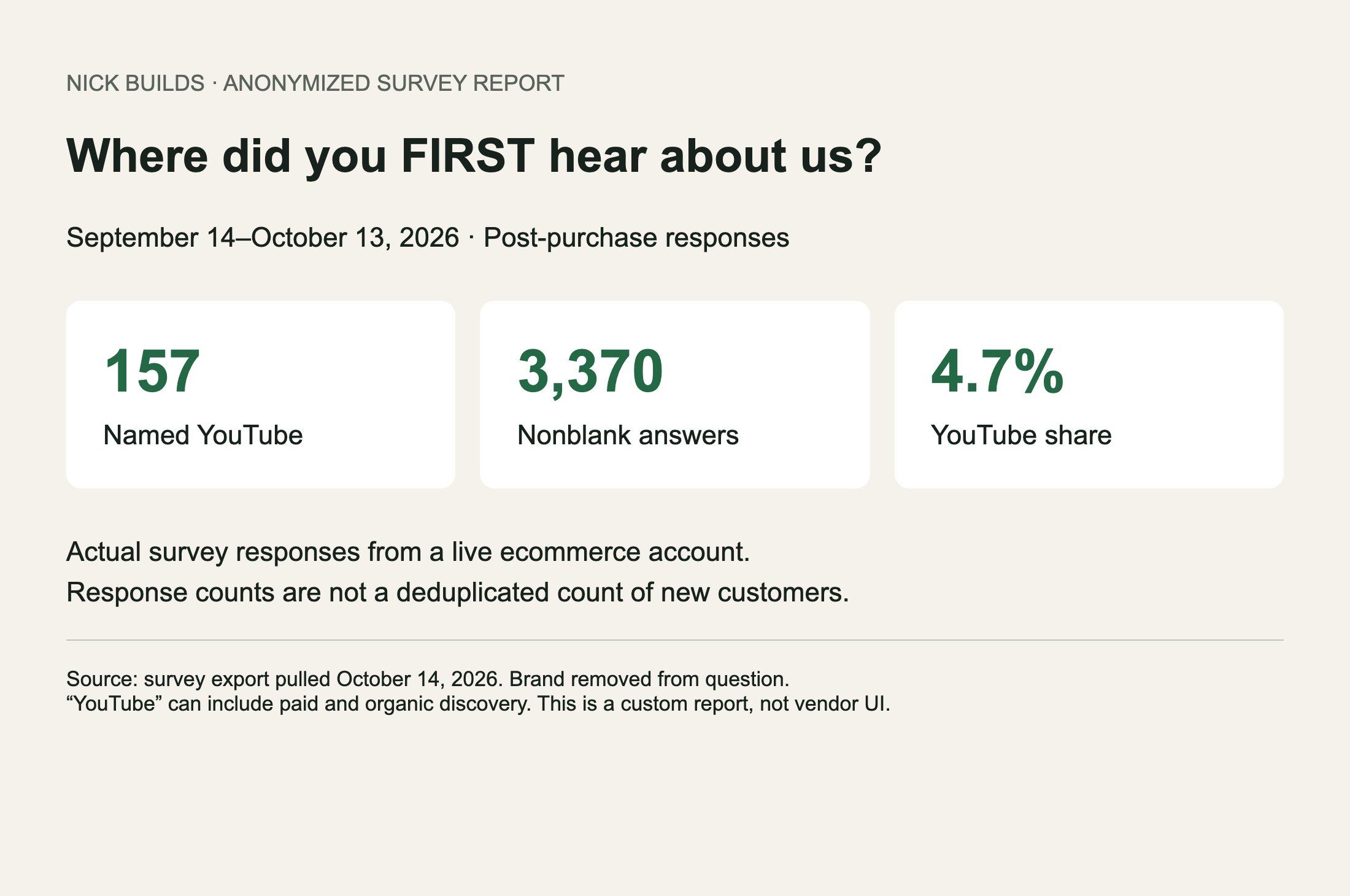
An anonymized report I made from the survey export pulled October 14, rather than a screenshot of the survey vendor’s interface. The brand name is removed from the question. These are response counts, not a deduplicated new-customer count.
For that same 30-day period, 157 of 3,370 nonblank responses named YouTube: 4.7%. I want to know how that share moves as we change the ads and the spend. I also want to check how many buyers answer, and separate first-time buyers from returning customers before calculating new-customer acquisition cost.
A survey won’t tell you everything. People forget, some don’t answer, and “YouTube” can mean an organic video as well as an ad. But hearing directly from buyers gives me evidence I’d miss if I only looked at the session that closed the sale. It’s why I’m such a believer in collecting your own customer data.
I covered the order matching and survey-adjusted estimates in the $51,700 YouTube breakdown. Keep those estimates separate from platform attribution. Adding them together would count overlapping purchases twice.
Put the survey next to MER
Multi-touch attribution tools can get expensive and complicated quickly. You can spend a lot of time arguing over which dashboard is right. Before doing that, I want a simpler view of the business: are we spending more, and are we getting enough more back?
I use MER here as total store revenue divided by total paid-media spend, across all channels, over the same period. Pick a consistent revenue definition, including how you handle refunds, and stick with it. MER includes returning-customer revenue, so I also watch new-customer volume and acquisition cost.
For example, $100,000 in revenue on $20,000 in ad spend is 5x MER. If spend rises to $25,000 and revenue reaches $125,000, MER stays at 5x while the business grows. If revenue stays at $100,000, it drops to 4x. Those are illustrative numbers, but that’s the question I want the report to answer. Whether either result is profitable depends on margins and the rest of the costs.
For a lower-priced ecommerce product, I’d expect to learn something from weekly trends and a monthly view. Someone buying a $60 shirt usually has a different decision process from a business signing a six-month enterprise software deal. Some purchases happen the same day, others a week or two later. I’d check the actual purchase lag before deciding how quickly a test should pay back; an order value under $200 doesn’t guarantee a particular timeline.
Then I put the evidence together. Is YouTube’s share of survey answers growing? Are more first-time customers buying? Is revenue growing enough to support the extra spend? Are we maintaining an MER the business can afford?
GA4 and Google Ads still help me understand the paths and spot problems. Platform CPA helps me compare ads. Surveys help me understand discovery. MER tells me what the whole business is getting back for its advertising spend. Promotions, seasonality, and returning buyers can move those numbers too, so agreement between them is a useful signal, not proof that YouTube caused every extra sale.
That’s enough to make a more informed next decision: keep testing, fix the creative or tracking, or increase spend carefully. I don’t need to pretend one dashboard has the full story.
Why I think it’s undervalued
Google asking for more money is predictable. What interests me is the combination of the product investment, what I’ve seen in a live account, and the creative we already have available to test.
If you’re getting sales from real people demonstrating your product on Meta, you may be closer to a useful YouTube test than you think. You already have footage, customer feedback, and some idea of which messages people respond to.
AI makes the preparation faster. It can work through transcripts, help find assets, draft variations, and check a campaign build. I still have to decide which videos are worth spending money on and what to do when performance disappoints.
Before commissioning another batch of ads, I’d go through the videos you already have. Pick a few that have sold the product, get the originals, and decide what a YouTube test needs to prove. That’s what I’m working on right now.